Local installation #7

Closed
opened 2017-04-17 15:35:01 +00:00 by fedorg · 26 comments
fedorg commented 2017-04-17 15:35:01 +00:00 (Migrated from github.com)

Update: install locally without MSSQL server

Hello Mark!

Firstly, I would like to thank you for your effort to share the awesome Celestial Altium library that you have compiled manually, I think the world would be a better place if more people possessed this kind of mindset.

The problem

I was somehow able to download the big Components.sql data file off of Github using

git clone --depth 1 https://github.com/issus/altium-library.git altium-library
cd altium-library

and spent the last evening trying to deploy the database on my local machine having no prior experience with MS SQL server. I was having trouble just plain executing the 200-odd MB query using sqlcmd, as it was giving off a substantial amount of errors related to non-existent databases and columns.

The solution

After some manual tinkering, I believe I've found the culprit: the sql project is missing some statements and columns that prevent the query from executing smoothly on a fresh machine.
Here's a list of things I had to do manually to be able to import the database:

  1. Install MS SQL Server (I used 2016) leaving the default Windows authentication enabled

  2. Add the missing fields to the DB\altium_library\Tables\Components.sql definition file:

     [SensingRange]                    NVARCHAR(50) NULL, 
     [ActuatorLevel]                   NVARCHAR(50) NULL, 
     [PartStatus]                      NVARCHAR(50) NULL, 
     [HeightAboveBoard]                NVARCHAR(50) NULL, 
     [ElectricalLife]                  VARCHAR(50) NULL, 
     [Axis]                            VARCHAR(50) NULL,
    
  3. Run PowerShell or CMD and navigate to the library definitions folder

    cd "DB\altium_library"
    
  4. Run sqlcmd -S localhost for an SQL prompt and create an empty database

    CREATE DATABASE altium_library
    GO
    EXIT
    
  5. Recreate the database structure by executing all query files in the folder
    (forfiles is available since Win7 at least)

    forfiles /s /m *.sql /c "cmd /c sqlcmd -S localhost -d altium_library -i @path"
    
  6. Run the big import command

    cd ..
    sqlcmd -S localhost -d altium_library -i "Components.sql" -o "output.log"
    
  7. Check for any errors in output.log. Normally, the file should just contain a bunch of repeating lines along the lines of (1 rows affected).

  8. Open Celestial Library Database.DbLib and use the following Connection string:

    Provider=SQLNCLI11.1;Integrated Security=SSPI;Persist Security Info=False;User ID="";Initial Catalog=altium_library;Data Source=localhost;Initial File Name="";Server SPN=""
    
  9. Test the connection and follow through with the rest of the installation instructons

Now normally I would have made this a pull request but I'm not quite sure if the steps I have provided are optimal. Besides, I'm not quite keen on Github's fork mechanics that demand users create useless clones of projects that they never intended to host on their page, and that whole process generates needless amounts of fuss. Now, back to the point - if you could add the steps needed for the local installation, I believe that can save some trouble for new people. The whole idea of local cloning will also help in the long run, if (when) you forget to update the Azure subscription, and generally is better for maintainability.


Using the opportunity, I would also like to ask you about the contribution model for the library. Are you planning to continue the development of this library, given how popular snapEDA is? If so, I couldn't find an easy way of adding the components to the library from the AD itself, maybe only using things like SVNDBLib, which again I'm not very familiar with. Am I missing something or the "community" update process (like adding new components) is indeed somewhat complicated?
And another question: Would you be fine with someone distributing the library using Torrents? Not that I know anyone or am planning to do this, but I believe the deployment process could be done much quicker in this fashion.
Please feel free to ignore these questions, though - I can fully understand how plowing through tons of messages on a public account can become a burden.

## Update: [install locally without MSSQL server](https://github.com/issus/altium-library/issues/7#issuecomment-296192286) Hello Mark! Firstly, I would like to thank you for your effort to share the awesome Celestial Altium library that you have compiled manually, I think the world would be a better place if more people possessed this kind of mindset. #### The problem I was somehow able to download the big `Components.sql` data file off of Github using ```cmd git clone --depth 1 https://github.com/issus/altium-library.git altium-library cd altium-library ``` and spent the last evening trying to deploy the database on my local machine having no prior experience with MS SQL server. I was having trouble just plain executing the 200-odd MB query using `sqlcmd`, as it was giving off a substantial amount of errors related to non-existent databases and columns. #### The solution After some manual tinkering, I believe I've found the culprit: the sql project is missing some statements and columns that prevent the query from executing smoothly on a fresh machine. Here's a list of things I had to do manually to be able to import the database: 1. Install MS SQL Server (I used 2016) leaving the default Windows authentication enabled 2. Add the missing fields to the `DB\altium_library\Tables\Components.sql` definition file: ```sql [SensingRange] NVARCHAR(50) NULL, [ActuatorLevel] NVARCHAR(50) NULL, [PartStatus] NVARCHAR(50) NULL, [HeightAboveBoard] NVARCHAR(50) NULL, [ElectricalLife] VARCHAR(50) NULL, [Axis] VARCHAR(50) NULL, ``` 3. Run PowerShell or CMD and navigate to the library definitions folder ```cmd cd "DB\altium_library" ``` 4. Run `sqlcmd -S localhost` for an SQL prompt and create an empty database ```sql CREATE DATABASE altium_library GO EXIT ``` 5. Recreate the database structure by executing all query files in the folder (`forfiles` is available since Win7 at least) ```cmd forfiles /s /m *.sql /c "cmd /c sqlcmd -S localhost -d altium_library -i @path" ``` 6. Run the big import command ```cmd cd .. sqlcmd -S localhost -d altium_library -i "Components.sql" -o "output.log" ``` 7. Check for any errors in `output.log`. Normally, the file should just contain a bunch of repeating lines along the lines of `(1 rows affected)`. 8. Open `Celestial Library Database.DbLib` and use the following Connection string: ``` Provider=SQLNCLI11.1;Integrated Security=SSPI;Persist Security Info=False;User ID="";Initial Catalog=altium_library;Data Source=localhost;Initial File Name="";Server SPN="" ``` 9. Test the connection and follow through with the rest of the installation instructons Now normally I would have made this a pull request but I'm not quite sure if the steps I have provided are optimal. Besides, I'm not quite keen on Github's fork mechanics that demand users create useless clones of projects that they never intended to host on their page, and that whole process generates needless amounts of fuss. Now, back to the point - if you could add the steps needed for the local installation, I believe that can save some trouble for new people. The whole idea of local cloning will also help in the long run, if (when) you forget to update the Azure subscription, and generally is better for maintainability. --------------------------------- Using the opportunity, I would also like to ask you about the contribution model for the library. Are you planning to continue the development of this library, given how popular snapEDA is? If so, I couldn't find an easy way of adding the components to the library from the AD itself, maybe only using things like SVNDBLib, which again I'm not very familiar with. Am I missing something or the "community" update process (like adding new components) is indeed somewhat complicated? And another question: Would you be fine with someone distributing the library using Torrents? Not that I know anyone or am planning to do this, but I believe the deployment process could be done much quicker in this fashion. Please feel free to ignore these questions, though - I can fully understand how plowing through tons of messages on a public account can become a burden.
fedorg commented 2017-04-18 15:19:23 +00:00 (Migrated from github.com)

As the maintainer of this repo is not very active at the moment, I've decided to upload a zipped DB folder for the folks who are unable to access the LFS. Don't worry, the archive is only 5 MB instead of the original 280. Please don't forget that this is not a full library, you still need to clone the repository or download a 110MB fixed repo snapshot in 7z format.
The SQL files in the both archives are already fixed, so you don't need to do step 2 from my previous post.

As the maintainer of this repo is not very active at the moment, I've decided to upload a [zipped DB folder](https://drive.google.com/file/d/0B0CX-S_m14UaUlNRb3I5Ri1EQlE/view?usp=sharing) for the folks who are unable to access the LFS. Don't worry, the archive is only 5 MB instead of the original 280. Please don't forget that this is not a full library, you still need to clone the repository or download a 110MB [fixed repo snapshot in 7z format](https://drive.google.com/file/d/0B0CX-S_m14UaaWxfbnVDdDdWd1U/view?usp=sharing). The SQL files in the both archives are already fixed, so you don't need to do step 2 from my previous post.
dadede commented 2017-04-21 00:50:20 +00:00 (Migrated from github.com)

Hi @fedorg ,

Thanks for stepping up to help with your comments! I've been having trouble getting this to work using the maintainers instructions but you already know he is not very active so I'm stuck waiting for access.

However, I would appreciate if you can help me figure this out in any way you can or with an integrated library. I've followed your steps but I just cant seem to get MSSQL installed. Thanks!

Hi @fedorg , Thanks for stepping up to help with your comments! I've been having trouble getting this to work using the maintainers instructions but you already know he is not very active so I'm stuck waiting for access. However, I would appreciate if you can help me figure this out in any way you can or with an integrated library. I've followed your steps but I just cant seem to get MSSQL installed. Thanks!
fedorg commented 2017-04-21 11:37:29 +00:00 (Migrated from github.com)

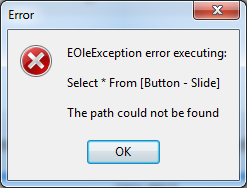
image
@dadede I've already tried that, but some things never change...

![image](https://cloud.githubusercontent.com/assets/4352852/25275790/b7949222-269f-11e7-80bc-78e54b960786.png) @dadede I've already tried that, but some things never change...
😆 1
fedorg commented 2017-04-21 13:35:55 +00:00 (Migrated from github.com)

@dadede I think I've managed to convert the database into MS Access format, please let me know if you have any better luck with this one. I like this method better, actually - it doesn't require any of that MSSQL garbage for one.

Installation without SQL server

  • Clone the repo
    git clone --depth 1 https://github.com/issus/altium-library.git altium-library
    cd altium-library
    
  • Download the Access database file Celestial.mdb and move it to the library folder.
  • Open Celestial Library Database.DbLib in Altium
  • Choose 'Microsoft Access' in the 'Database type' dropdown and select the downloaded .mdb file.
    image
  • Click 'Connect' or 'Reconnect', and then save the .DbLib by pressing Ctrl+S.
  • [optional] Delete unused folders to save a bit of space: .git DB
  • Install the library as usual.
@dadede I think I've managed to convert the database into MS Access format, please let me know if you have any better luck with this one. I like this method better, actually - it doesn't require any of that MSSQL garbage for one. ## Installation without SQL server * Clone the repo ```cmd git clone --depth 1 https://github.com/issus/altium-library.git altium-library cd altium-library ``` * Download the Access database file [Celestial.mdb](https://drive.google.com/file/d/0B0CX-S_m14UaSU1LU0dOYVoyemc/view?usp=sharing) and move it to the library folder. * Open `Celestial Library Database.DbLib` in Altium * Choose 'Microsoft Access' in the 'Database type' dropdown and select the downloaded .mdb file. ![image](https://cloud.githubusercontent.com/assets/4352852/25278746/09cf289c-26ad-11e7-9673-fc376a92b734.png) * Click 'Connect' or 'Reconnect', and then save the .DbLib by pressing Ctrl+S. * [optional] Delete unused folders to save a bit of space: `.git` `DB` * Install the library as usual.
👍 7
dadede commented 2017-04-22 03:32:19 +00:00 (Migrated from github.com)

@fedorg This is impressive!!!
Kudos to you, I would have never figured this out and you've probably helped others who would see this. Did you create the mdb file?

@fedorg This is impressive!!! Kudos to you, I would have never figured this out and you've probably helped others who would see this. Did you create the mdb file?
vidavidorra commented 2017-04-25 15:27:52 +00:00 (Migrated from github.com)

@fedorg @dadede Hi guys, I've contributed to this library in the past and the issue about the missing columns is because this isn't synced with GitHub LFS yet (this gets done about once a month due to the billing period).

For my information do you both have access to the database and didn;t get the connection working, or don't have access and therfore trying to run locally??

@fedorg @dadede Hi guys, I've contributed to this library in the past and the issue about the missing columns is because this isn't synced with GitHub LFS yet (this gets done about once a month due to the billing period). For my information do you both have access to the database and didn;t get the connection working, or don't have access and therfore trying to run locally??
dadede commented 2017-04-25 18:24:02 +00:00 (Migrated from github.com)

@vidavidorra I don't have access and I'm trying to run locally. I think it would be the same in @fedorg case because he figured out a hack for local access but I haven't gotten to test it out fully.

@vidavidorra I don't have access and I'm trying to run locally. I think it would be the same in @fedorg case because he figured out a hack for local access but I haven't gotten to test it out fully.
vidavidorra commented 2017-04-25 20:41:04 +00:00 (Migrated from github.com)

@fedorg To come back on the last section of your fist comment. Now, I don't know how snapEDA works since I've never used it but, this library has high quality 3D models and a whole lot of parameters listed with each component. These parameters can be used to filter in altium designer (AD) e.g. for only 0603 caps and *pF.
The idea of this library is to have the components in libraries which are under version control by GitHub and a hosted database which links the schematic and footprint libraries together and lists all the relevant parameters for that part. Therefore the contribution to this library is done by adding the components to the relevant libraries and (currently) passing the part number and digikey listing for the parts to Mark. He'll than add the components to the database library and merges the pull request. I don't know why he's not active at the moment though.
I'm currently working on a program which enables (selected) users to add the components to a database themselves (which requires login credentials and write access of course) and that searches for all the parameters that need to go into the database. I'm currently focusing on Farnell as supplier to get the parameters from since I live in Europe and Farnell is my go-to supplier. But that is still a work in progress (I'm very busy with work at the moment).
For access to the database a web portal/page where users can create login credentials would be nice, but also currently no time for that. That at least would give users access to the database faster and eliminates the need (except for speed of course) to host the database locally.
I'm hoping to hear something from @issus here, but otherwise I'll try to run an hosted (and up to date) instance of the database on AWS or Azure. (Would take me some time of course to get this all up and running so I can't say when this could be happening.) But is there need for this? Because I don't want to waste my time on something that isn't necessary 😉

I'd appreciate to hear what you guys think!

@fedorg To come back on the last section of your fist comment. Now, I don't know how snapEDA works since I've never used it but, this library has high quality 3D models and a whole lot of parameters listed with each component. These parameters can be used to filter in altium designer (AD) e.g. for only 0603 caps and `*pF`. The idea of this library is to have the components in libraries which are under version control by GitHub and a hosted database which links the schematic and footprint libraries together and lists all the relevant parameters for that part. Therefore the contribution to this library is done by adding the components to the relevant libraries and (currently) passing the part number and digikey listing for the parts to Mark. He'll than add the components to the database library and merges the pull request. I don't know why he's not active at the moment though. I'm currently working on a program which enables (selected) users to add the components to a database themselves (which requires login credentials and write access of course) and that searches for all the parameters that need to go into the database. I'm currently focusing on Farnell as supplier to get the parameters from since I live in Europe and Farnell is my go-to supplier. But that is still a work in progress (I'm very busy with work at the moment). For access to the database a web portal/page where users can create login credentials would be nice, but also currently no time for that. That at least would give users access to the database faster and eliminates the need (except for speed of course) to host the database locally. I'm hoping to hear something from @issus here, but otherwise I'll try to run an hosted (and up to date) instance of the database on AWS or Azure. (Would take me some time of course to get this all up and running so I can't say when this could be happening.) **But is there need for this?** Because I don't want to waste my time on something that isn't necessary 😉 I'd appreciate to hear what you guys think!
issus commented 2017-05-06 08:00:12 +00:00 (Migrated from github.com)

I finally had a chance to deal with database stuff. I've not had any free time at all recently, so I made a big push to get the desktop app done (at least to the point of setting up the DbLib) today: https://github.com/issus/CelestialADB-Desktop

With over 200 waiting requests for access, it was certainly at the point that it was easier to finish the app than add all the users (even when I've been spending my lunch breaks in the past adding users, its hard to keep up!)

I've dropped components.sql from the repo, and updated the sqlprj (and therefore its sql files) into github directly, dropping LFS completely.

I've been working pretty long hours at work getting firmware finished and prototypes built, so not much Altium design work over the past few months - then on top of that my Etsy store is doing really well, so all my remaining free time at home has been spent in the workshop rather than at the computer! Simply not enough hours in the day :(

Getting a local database setup from the desktop app is pretty high on my priority list, but again, my free time is extremely limited. There's web services in place for getting the view data out in a non-sql way so it can be used to generically create databases views in their own format, and also be used to diff a local view/table against the Azure master. Creating BOMs takes way too long off Azure. Next on the priority list is a way to add components to the local database, and then create a "pull request" of sorts for those up to Azure. The tool I use for adding components from Digikey items was always just temporary but I'm still using it more than a year later...

I finally had a chance to deal with database stuff. I've not had any free time at all recently, so I made a big push to get the desktop app done (at least to the point of setting up the DbLib) today: https://github.com/issus/CelestialADB-Desktop With over 200 waiting requests for access, it was certainly at the point that it was easier to finish the app than add all the users (even when I've been spending my lunch breaks in the past adding users, its hard to keep up!) I've dropped components.sql from the repo, and updated the sqlprj (and therefore its sql files) into github directly, dropping LFS completely. I've been working pretty long hours at work getting firmware finished and prototypes built, so not much Altium design work over the past few months - then on top of that my Etsy store is doing really well, so all my remaining free time at home has been spent in the workshop rather than at the computer! Simply not enough hours in the day :( Getting a local database setup from the desktop app is pretty high on my priority list, but again, my free time is extremely limited. There's web services in place for getting the view data out in a non-sql way so it can be used to generically create databases views in their own format, and also be used to diff a local view/table against the Azure master. Creating BOMs takes way too long off Azure. Next on the priority list is a way to add components to the local database, and then create a "pull request" of sorts for those up to Azure. The tool I use for adding components from Digikey items was always just temporary but I'm still using it more than a year later...
junife commented 2017-06-10 07:54:11 +00:00 (Migrated from github.com)

@fedorg, what tools of application used for open the Celestial Library Database.DbLib file, then will display the "source of Connection" dialog box. Thanks....

@fedorg, what tools of application used for open the Celestial Library Database.DbLib file, then will display the "source of Connection" dialog box. Thanks....
fedorg commented 2017-06-10 19:21:06 +00:00 (Migrated from github.com)

@junife I think it was a plain text file, nothing too fancy. Do you have the latest repo snapshot? I believe that the sql files that caused the installation failures have been fixed since then.

@junife I think it was a plain text file, nothing too fancy. Do you have the latest repo snapshot? I believe that the sql files that caused the installation failures have been fixed since then.
junife commented 2017-06-11 01:01:04 +00:00 (Migrated from github.com)

@fedorg I followed your process "Installation without SQL Server", my process see following:

1 Clone the repo use git command from your step1, the altium-library folder size about 621 MB
2017-06-11_08-49-21

2 Download database file Celestial.mdb to my computer and the size about 60.6 MB, copy this file to folder Celestial.mdb
3 I use Access 2013 open the file Celestial.mdb.
2017-06-11_08-48-35
4 Install Celestial Library Database.DbLib to Altium Designer libraries
2017-06-11_08-56-16
5 But I open any library in Altium Designer get wrong information
2017-06-11_08-57-28

Please help me what wrong with my steps. Thanks..

@fedorg I followed your process "Installation without SQL Server", my process see following: 1 Clone the repo use git command from your step1, the altium-library folder size about 621 MB ![2017-06-11_08-49-21](https://user-images.githubusercontent.com/7646423/27007356-3c7baee8-4e83-11e7-862a-167521901987.png) 2 Download database file Celestial.mdb to my computer and the size about 60.6 MB, copy this file to folder Celestial.mdb 3 I use Access 2013 open the file Celestial.mdb. ![2017-06-11_08-48-35](https://user-images.githubusercontent.com/7646423/27007366-9297d504-4e83-11e7-9c6c-16afd98270a3.png) 4 Install Celestial Library Database.DbLib to Altium Designer libraries ![2017-06-11_08-56-16](https://user-images.githubusercontent.com/7646423/27007379-04bd8732-4e84-11e7-8639-0f86098c22e3.png) 5 But I open any library in Altium Designer get wrong information ![2017-06-11_08-57-28](https://user-images.githubusercontent.com/7646423/27007388-56b4baa6-4e84-11e7-8fe7-f6483718559a.png) Please help me what wrong with my steps. Thanks..
Liddo-kun commented 2017-06-16 10:41:03 +00:00 (Migrated from github.com)

Hello Mark,

thank you for the great library. Your work can really help others if altium came with this setup by default! lol

I had another suggestion for offline library. And a request.
Can you upload a IntLib package of your library? it does not need to be terribly up to date. Maybe Quarterly or Semiannually.
For someone like me, I don't like all the complication of database systems, Access, and I like to have a workstation that can work offline also. I am a ME, getting into PCB stuffs, and the database stuff was too much for me and I don't like to use something i don't fully understand. It was quite hard for me to even get your library working! lol
One can accomplish a "local installation" much easier by making a IntLib library downloadable.
And a great benefit - Circuit Studio and Circuit Maker users can use your library.

Here, I already did most of it (June 14, 2017)
https://1drv.ms/u/s!AuqwBZb5n5Jqgr1VbgeUY1nRZ4GwkA

^^^This is all of your library in IntLib format, which also works with Circuit Studio btw.
EXCEPT Resistor - Chip*****

My personal request to you if you - could you try to convert your chip resistor section to intlib format?
I was able to convert everything except that section. My computer slows down and gets stuck.

Just open the "Celestial Library Database.DbLib" file
Then Tools -->Offline Integrated Library Maker--->check source file and destination paths
Then deselect everything except "Resistor - Chip" (yes you have to manually deselect each item)
And try to export it.

Everything seems to work perfect - you get a fully integrated offline library and all the symbols, footprints and 3d models that you made which stay together perfectly. Then combine this with the altium official libraries from Altium 10 and you have a real nice integrated library.
http://techdocs.altium.com/display/ADOH/Download+Libraries

Don't forget this has a nice benefit in that Circuit Studio and Circuit Maker users can access your great library as well.

Hello Mark, thank you for the great library. Your work can really help others if altium came with this setup by default! lol I had another suggestion for offline library. And a request. Can you upload a IntLib package of your library? it does not need to be terribly up to date. Maybe Quarterly or Semiannually. For someone like me, I don't like all the complication of database systems, Access, and I like to have a workstation that can work offline also. I am a ME, getting into PCB stuffs, and the database stuff was too much for me and I don't like to use something i don't fully understand. It was quite hard for me to even get your library working! lol One can accomplish a "local installation" much easier by making a IntLib library downloadable. And a great benefit - Circuit Studio and Circuit Maker users can use your library. Here, I already did most of it (June 14, 2017) https://1drv.ms/u/s!AuqwBZb5n5Jqgr1VbgeUY1nRZ4GwkA ^^^This is all of your library in IntLib format, which also works with Circuit Studio btw. **EXCEPT Resistor - Chip******* My personal request to you if you - could you try to convert your chip resistor section to intlib format? I was able to convert everything except that section. My computer slows down and gets stuck. Just open the "Celestial Library Database.DbLib" file Then Tools -->Offline Integrated Library Maker--->check source file and destination paths Then deselect everything except "Resistor - Chip" (yes you have to manually deselect each item) And try to export it. Everything seems to work perfect - you get a fully integrated offline library and all the symbols, footprints and 3d models that you made which stay together perfectly. Then combine this with the altium official libraries from Altium 10 and you have a real nice integrated library. http://techdocs.altium.com/display/ADOH/Download+Libraries Don't forget this has a nice benefit in that Circuit Studio and Circuit Maker users can access your great library as well.
Liddo-kun commented 2017-06-16 10:54:06 +00:00 (Migrated from github.com)

There was also two other issues with exporting your dblib:

  1. ceramic capacitor - causes AD to crash once completed, but it seems to have exported okay. Both the IntLib and your DBLib show 8,xxx parts

    • Rectangular w/ Magnetic
      ****this one fails and causes all sorts of errors.
      I narrowed down the issue to the name containing a "/" - it messes with directory creation
      since this is a small library I just skipped it.
  2. f course I still have not been able to export your Resistor - Chip section.

There was also two other issues with exporting your dblib: 1. ceramic capacitor - causes AD to crash once completed, but it seems to have exported okay. Both the IntLib and your DBLib show 8,xxx parts 2. - Rectangular w/ Magnetic ****this one fails and causes all sorts of errors. I narrowed down the issue to the name containing a "/" - it messes with directory creation since this is a small library I just skipped it. 3. f course I still have not been able to export your Resistor - Chip section.
neilpanchal commented 2017-09-17 18:06:04 +00:00 (Migrated from github.com)

I am having a hard time getting the connection working and looking to install this library locally.

What I don't understand is why is this library done using this whole server biz? Lot of the times we don't have access to internet and it is useless. Make a guide to install it locally.

I am having a hard time getting the connection working and looking to install this library locally. What I don't understand is why is this library done using this whole server biz? Lot of the times we don't have access to internet and it is useless. Make a guide to install it locally.
issus commented 2017-09-17 22:42:38 +00:00 (Migrated from github.com)

It's a database library, and having a centrally hosted database allows
everyone to access the most recent version without having to try to figure
out database merges or need to setup a database server on their computer.

On 17 September 2017 at 12:06, Neil Panchal notifications@github.com
wrote:

I am having a hard time getting the connection working and looking to
install this library locally.

What I don't understand is why is this library done using this whole
server biz? Lot of the times we don't have access to internet and it is
useless. Make a guide to install it locally.


You are receiving this because you were mentioned.
Reply to this email directly, view it on GitHub
https://github.com/issus/altium-library/issues/7#issuecomment-330066516,
or mute the thread
https://github.com/notifications/unsubscribe-auth/ABXBPNmCts2DWI4OhUSWP_bj4JhZkp89ks5sjV-NgaJpZM4M_QFS
.

It's a database library, and having a centrally hosted database allows everyone to access the most recent version without having to try to figure out database merges or need to setup a database server on their computer. On 17 September 2017 at 12:06, Neil Panchal <notifications@github.com> wrote: > I am having a hard time getting the connection working and looking to > install this library locally. > > What I don't understand is why is this library done using this whole > server biz? Lot of the times we don't have access to internet and it is > useless. Make a guide to install it locally. > > — > You are receiving this because you were mentioned. > Reply to this email directly, view it on GitHub > <https://github.com/issus/altium-library/issues/7#issuecomment-330066516>, > or mute the thread > <https://github.com/notifications/unsubscribe-auth/ABXBPNmCts2DWI4OhUSWP_bj4JhZkp89ks5sjV-NgaJpZM4M_QFS> > . >
amtlib-dot-dll commented 2017-10-14 10:00:41 +00:00 (Migrated from github.com)

Well I suggest that a standalone IntLib is necessary, though hard to auto-upgrade, because neither MSSQL nor Access DB is usable in my Linux desktop via Wine. Thank you very much.

Well I suggest that a standalone IntLib is necessary, though hard to auto-upgrade, because neither MSSQL nor Access DB is usable in my Linux desktop via [Wine](https://www.winehq.org/). Thank you very much.
zbrozek commented 2018-08-24 13:00:00 +00:00 (Migrated from github.com)

@fedorg any chance you have an updated dump to Access? It looks like both the SQL server is down and the posted MDB is quite out of date. Thank you!

@fedorg any chance you have an updated dump to Access? It looks like both the SQL server is down and the posted MDB is quite out of date. Thank you!
👍 2
lollokara commented 2018-12-15 10:32:48 +00:00 (Migrated from github.com)

Ok... I've spent 2 days now working on getting this on local since i'm always travelling without connection.
Solution is not simple and require to host a local DB but it works, and is easy to update. If anyone want to help, i still have to figure out a way to get the local DB converted into MDB file so no local DB is required anymore.
To get this going SQL Server 2017 Express is needed, is free and lightweight.
After installing a new app is present: Import Export data SQL Server, open it Select from sources SQL Native Client, and configure the connection following the UDL file, so server is csql.database.windows.net user is your account @ csql and password is your password, database is altium_library just simply click next, as destination select SQL Native Client and leave the server field as is now, auth is not needed, on database select new and name it altium_library, for space i used 100MB and 100MB not sure how much is needed but it works, just set max space increase 100%. Then next, leave everything as is, next select all the tables, and next shoud freeze for some time, after that just keep clicking next until it starts the copy.
Once finisced, Open Celestial Library Database.DbLib and use the following Connection string:

Provider=SQLNCLI11.1;Integrated Security=SSPI;Persist Security Info=False;User ID="";Initial Catalog=altium_library;Data Source=localhost;Initial File Name="";Server SPN=""

Instead of localhost copy the destination server name from the app before, should be desktopname\SQLEXPRESS click connect or reconnect and boom local copy done, to update the local copy just do all the steps apart from this one, should update the local copy, if not sure, drop the local DB and create a new one just to be sure. Merry Cristmas!

Ok... I've spent 2 days now working on getting this on local since i'm always travelling without connection. Solution is not simple and require to host a local DB but it works, and is easy to update. If anyone want to help, i still have to figure out a way to get the local DB converted into MDB file so no local DB is required anymore. To get this going SQL Server 2017 Express is needed, is free and lightweight. After installing a new app is present: Import Export data SQL Server, open it Select from sources `SQL Native Client`, and configure the connection following the UDL file, so server is `csql.database.windows.net` user is your `account @ csql` and password is your password, database is `altium_library` just simply click next, as destination select `SQL Native Client` and leave the server field as is now, auth is not needed, on database select new and name it `altium_library`, for space i used 100MB and 100MB not sure how much is needed but it works, just set max space increase 100%. Then next, leave everything as is, next select all the tables, and next shoud freeze for some time, after that just keep clicking next until it starts the copy. Once finisced, Open `Celestial Library Database.DbLib` and use the following Connection string: `Provider=SQLNCLI11.1;Integrated Security=SSPI;Persist Security Info=False;User ID="";Initial Catalog=altium_library;Data Source=localhost;Initial File Name="";Server SPN=""` Instead of localhost copy the destination server name from the app before, should be `desktopname\SQLEXPRESS` click connect or reconnect and boom local copy done, to update the local copy just do all the steps apart from this one, should update the local copy, if not sure, drop the local DB and create a new one just to be sure. Merry Cristmas!
amtlib-dot-dll commented 2019-02-21 01:47:44 +00:00 (Migrated from github.com)

@fedorg Thanks for your contribution, would you share us how to convert the library to an offline Access library? Thanks!

@fedorg Thanks for your contribution, would you share us how to convert the library to an offline Access library? Thanks!
amtlib-dot-dll commented 2019-02-24 04:52:47 +00:00 (Migrated from github.com)

I tried to dump the database from the server csql.database.windows.net, to Access 2010 use the Import and Export Data wizard. Two problems were encountered:

  • The default data type for the conversion is LongText, which is unrecognizable by Altium. The file uploaded by @fedorg has data types of Text(255) and I wonder how to get it in an easy way. In the wizard I can change the data type but I need to change it one by one due to the limitation imposed by SQL Server Express.

  • The "Components" row cannot be imported with an error message of "Query too long". There are actually too many fields in this table. Though this table is unnecessary for Altium Designer, I wonder how @fedorg achieved this.

I tried to dump the database from the server `csql.database.windows.net`, to Access 2010 use the Import and Export Data wizard. Two problems were encountered: * The default data type for the conversion is `LongText`, which is unrecognizable by Altium. The file uploaded by @fedorg has data types of `Text(255)` and I wonder how to get it in an easy way. In the wizard I _can_ change the data type but I need to change it one by one due to the limitation imposed by SQL Server Express. * The "Components" row cannot be imported with an error message of "Query too long". There are actually too many fields in this table. Though this table is unnecessary for Altium Designer, I wonder how @fedorg achieved this.
lollokara commented 2019-02-24 23:22:39 +00:00 (Migrated from github.com)

I tried to dump the database from the server csql.database.windows.net, to Access 2010 use the Import and Export Data wizard. Two problems were encountered:

  • The default data type for the conversion is LongText, which is unrecognizable by Altium. The file uploaded by @fedorg has data types of Text(255) and I wonder how to get it in an easy way. In the wizard I can change the data type but I need to change it one by one due to the limitation imposed by SQL Server Express.
  • The "Components" row cannot be imported with an error message of "Query too long". There are actually too many fields in this table. Though this table is unnecessary for Altium Designer, I wonder how @fedorg achieved this.

Do not try to convert to Access, that won't work. If you have a local SQL server just dump it to the local installation and make Altium point to that server.

> I tried to dump the database from the server `csql.database.windows.net`, to Access 2010 use the Import and Export Data wizard. Two problems were encountered: > > * The default data type for the conversion is `LongText`, which is unrecognizable by Altium. The file uploaded by @fedorg has data types of `Text(255)` and I wonder how to get it in an easy way. In the wizard I _can_ change the data type but I need to change it one by one due to the limitation imposed by SQL Server Express. > * The "Components" row cannot be imported with an error message of "Query too long". There are actually too many fields in this table. Though this table is unnecessary for Altium Designer, I wonder how @fedorg achieved this. Do not try to convert to Access, that won't work. If you have a local SQL server just dump it to the local installation and make Altium point to that server.
amtlib-dot-dll commented 2019-02-25 04:24:53 +00:00 (Migrated from github.com)

A script to craft the Access database in PowerShell. Follow the steps mentioned above

$factory = [System.Data.Common.DbProviderFactories]::GetFactory('System.Data.SqlClient')
$builder = $factory.CreateConnectionStringBuilder()
$builder['Initial Catalog'] = 'altium_library'
$builder['Data Source'] = 'csql.database.windows.net'
$builder['User ID'] = 'user@csql' # YOUR USERNAME HERE, -> Celestial Library Database.udl
$builder['Password'] = 'pass' # YOUR PASSWORD HERE, -> Celestial Library Database.udl
$sqlsrv = $factory.CreateConnection()
$sqlsrv.ConnectionString = $builder.ConnectionString
$sqlsrv.Open()

$factory = [System.Data.Common.DbProviderFactories]::GetFactory('System.Data.OleDb')
$builder = $factory.CreateConnectionStringBuilder()
$builder['Provider'] = 'Microsoft.ACE.OLEDB.12.0'
$builder['Data Source'] = 'Celestial.accdb' # FULL PATH TO YOUR LOCAL DATABASE
$access = $factory.CreateConnection()
$access.ConnectionString = $builder.ConnectionString
$access.Open()

$mapping = @{
    int = 'Long', [System.Data.DbType]::Decimal
    money = 'Currency', [System.Data.DbType]::Decimal
    varchar = 'Text(255)', [System.Data.DbType]::String
    nvarchar = 'Text(255)', [System.Data.DbType]::String
}

$tables = @{}
$sqlsrv.GetSchema('Tables').Select() | ? TABLE_SCHEMA -EQ dbo | ? TABLE_TYPE -EQ VIEW | % TABLE_NAME | % {
    $tables[$_] = $null
}
$columns = $sqlsrv.GetSchema('Columns').Select() | ? TABLE_NAME -In $tables.Keys
if (diff ($columns | % DATA_TYPE | sort -Unique) ($mapping.Keys | sort) -PassThru) {
    throw
}
@($tables.Keys) | % {
    $tables[$_] = $columns | ? TABLE_NAME -eq $_ | sort ORDINAL_POSITION
}

$sqlsrv_command = $sqlsrv.CreateCommand()
$access_command = $access.CreateCommand()

$tables.Keys | % {
    Write-Host "Cloning [$_]"
    $sqlsrv_command.CommandText = "select * from [dbo].[$_]"
    $transaction = $access.BeginTransaction()
    $access_command.Transaction = $transaction

    $access_command.CommandText = "create table ``$_`` ($(($tables[$_] | % {
        "``$($_.COLUMN_NAME)`` $($mapping[$_.DATA_TYPE][0])"
    }) -join ','))"
    $access_command.ExecuteNonQuery() | Out-Null

    $count = 0
    $reader = $sqlsrv_command.ExecuteReader()
    while ($reader.Read()) {
        $access_command.CommandText = "insert into ``$_`` values ($(@('?') * $tables[$_].Length -join ','))"
        $access_command.Parameters.Clear()

        foreach ($index in 0..($tables[$_].Length - 1)) {
            $param = $access_command.CreateParameter()
            $param.DbType = $mapping[$tables[$_][$index].DATA_TYPE][1]
            $param.Value = $reader[$index]
            $access_command.Parameters.Add($param) | Out-Null
        }
        $access_command.ExecuteNonQuery() | Out-Null
        $count++
    }

    $transaction.Commit()
    $reader.Dispose()
    $transaction.Dispose()
    Write-Host "Transferred $count records"
}

$sqlsrv_command.Dispose()
$access_command.Dispose()
$sqlsrv.Dispose()
$access.Dispose()
A script to craft the Access database in PowerShell. Follow the steps mentioned [above](#issuecomment-296192286) ```powershell $factory = [System.Data.Common.DbProviderFactories]::GetFactory('System.Data.SqlClient') $builder = $factory.CreateConnectionStringBuilder() $builder['Initial Catalog'] = 'altium_library' $builder['Data Source'] = 'csql.database.windows.net' $builder['User ID'] = 'user@csql' # YOUR USERNAME HERE, -> Celestial Library Database.udl $builder['Password'] = 'pass' # YOUR PASSWORD HERE, -> Celestial Library Database.udl $sqlsrv = $factory.CreateConnection() $sqlsrv.ConnectionString = $builder.ConnectionString $sqlsrv.Open() $factory = [System.Data.Common.DbProviderFactories]::GetFactory('System.Data.OleDb') $builder = $factory.CreateConnectionStringBuilder() $builder['Provider'] = 'Microsoft.ACE.OLEDB.12.0' $builder['Data Source'] = 'Celestial.accdb' # FULL PATH TO YOUR LOCAL DATABASE $access = $factory.CreateConnection() $access.ConnectionString = $builder.ConnectionString $access.Open() $mapping = @{ int = 'Long', [System.Data.DbType]::Decimal money = 'Currency', [System.Data.DbType]::Decimal varchar = 'Text(255)', [System.Data.DbType]::String nvarchar = 'Text(255)', [System.Data.DbType]::String } $tables = @{} $sqlsrv.GetSchema('Tables').Select() | ? TABLE_SCHEMA -EQ dbo | ? TABLE_TYPE -EQ VIEW | % TABLE_NAME | % { $tables[$_] = $null } $columns = $sqlsrv.GetSchema('Columns').Select() | ? TABLE_NAME -In $tables.Keys if (diff ($columns | % DATA_TYPE | sort -Unique) ($mapping.Keys | sort) -PassThru) { throw } @($tables.Keys) | % { $tables[$_] = $columns | ? TABLE_NAME -eq $_ | sort ORDINAL_POSITION } $sqlsrv_command = $sqlsrv.CreateCommand() $access_command = $access.CreateCommand() $tables.Keys | % { Write-Host "Cloning [$_]" $sqlsrv_command.CommandText = "select * from [dbo].[$_]" $transaction = $access.BeginTransaction() $access_command.Transaction = $transaction $access_command.CommandText = "create table ``$_`` ($(($tables[$_] | % { "``$($_.COLUMN_NAME)`` $($mapping[$_.DATA_TYPE][0])" }) -join ','))" $access_command.ExecuteNonQuery() | Out-Null $count = 0 $reader = $sqlsrv_command.ExecuteReader() while ($reader.Read()) { $access_command.CommandText = "insert into ``$_`` values ($(@('?') * $tables[$_].Length -join ','))" $access_command.Parameters.Clear() foreach ($index in 0..($tables[$_].Length - 1)) { $param = $access_command.CreateParameter() $param.DbType = $mapping[$tables[$_][$index].DATA_TYPE][1] $param.Value = $reader[$index] $access_command.Parameters.Add($param) | Out-Null } $access_command.ExecuteNonQuery() | Out-Null $count++ } $transaction.Commit() $reader.Dispose() $transaction.Dispose() Write-Host "Transferred $count records" } $sqlsrv_command.Dispose() $access_command.Dispose() $sqlsrv.Dispose() $access.Dispose() ```
🚀 1
gyohng commented 2019-08-28 19:30:10 +00:00 (Migrated from github.com)

A script in python that downloads the databases locally (should be run from the folder where the git repository is cloned). It also patches the legacy library to use the correct paths for footprints and symbols. It requires python3, and the only external dependency is the pymssql module ( pip3 install pymssql )

The database connection works with SQLite3 Datasource - very lean, requires no local SQL server, system configuration or any MS components. http://www.ch-werner.de/sqliteodbc/

The only catch is that the DbLib files should have a full path to the sqlite files downloaded by this script, which this script attempts to create (xxxxx Local.DbLib)

Please edit the script to include your alib_* user name and password (created via the altiumlibrary web site). Make sure that the created database user has access to both altium_library and altium_legacy.

The script itself works perfectly well on both Linux and MacOS as well as Windows, so if at any point somebody wants to provide an automatic generator/installer for these libraries, it will be possible to reasonably automate it on a non-Microsoft system in a fairly straightforward way.

#!/usr/bin/env python3

USER     = 'alib_xxxxxxxxx'
PASSWORD = 'xxxxxxxxxxxxxxxxxxxx'

import _mssql, decimal
import pymssql, json, sqlite3, time, os, os.path, re, sys
from decimal import Decimal

def decimalToDouble(dec):
    return float(dec)

sqlite3.register_adapter(Decimal, decimalToDouble)

def downloadLibrary(FILENAME, USER, PASSWORD, DATABASE):
    print('Downloading database', DATABASE, 'to', FILENAME)

    conn = pymssql.connect('db.altiumlibrary.com',USER,PASSWORD,DATABASE)
    cur = conn.cursor(as_dict=True)

    cur.execute('SELECT * FROM information_schema.TABLES')
    tables = list(cur)
    cur.execute('SELECT * FROM information_schema.COLUMNS')
    cols = list(cur)

    try:
        os.remove(FILENAME)
    except:
        pass

    sqconn = sqlite3.connect(FILENAME)
    sqcur = sqconn.cursor()

    tab = { }
    for r in tables:
        r['cols']  = { }
        r['icols'] = [ ]
        tab[r['TABLE_NAME']] = r

    for c in cols:
        tn = c['TABLE_NAME']
        if tn not in tab:
            continue
        t = tab[tn]
        cn = c['COLUMN_NAME']
        t['cols'][cn] = c
        t['icols'].append(c)
        t['icols'].sort(key=lambda x: int(x['ORDINAL_POSITION']))

    def typeconv(c):
        s = c['DATA_TYPE']
        s = s.upper().strip()
        if s=='NVARCHAR':
            #print(c)
            s+='('+str(c['CHARACTER_MAXIMUM_LENGTH'])+')'
        elif s=='MONEY':
            s+='('+str(c['NUMERIC_PRECISION'])+','+str(c['NUMERIC_SCALE'])+')'
        if s=='INT': return 'INTEGER'
        return s

    for tn in sorted(tab.keys()):
        if tn.startswith('z_'): # Do not create real tables, only views
            continue

        t = tab[tn]
        cs = [ f'CREATE TABLE IF NOT EXISTS "{t["TABLE_NAME"]}" (\n    ' ]

        for c in t['icols']:
            if len(cs)>1:
                cs.append(',\n    ')
            cs.append(f'"{c["COLUMN_NAME"]}" {typeconv(c)}')
            if c['IS_NULLABLE']=='NO' and (c['ORDINAL_POSITION']==1 or c['COLUMN_NAME'].upper()=='PARTID') and c['DATA_TYPE']=='int':
                cs.append(' PRIMARY KEY')
            if c['IS_NULLABLE']=='NO':
                cs.append(' NOT NULL')
            if c['COLUMN_DEFAULT'] is not None:
                cs.append(f' DEFAULT "{c["COLUMN_DEFAULT"]}"')

        cs.append(' )')
        cs = ''.join(cs)
        try:
            sqcur.execute(cs)
        except:
            print('Error in:',cs)
            raise

    sqconn.commit()

    for tn in sorted(tab.keys()):
        if tn.startswith('z_'): # Do not create real tables, only views
            continue

        print('Downloading',tn)
        cur.execute(f'SELECT * FROM "{tn}"')
        ctr = 0
        for r in cur:
            qry = ['INSERT OR REPLACE INTO "'+tn+'" ("']
            k = sorted(r.keys())
            qry.append('","'.join(k))
            qry.append('") VALUES (')
            qry.append(','.join(["?"]*len(k)))
            v = [r[ik] for ik in k]
            qry.append(')')

            qry = ''.join(qry)
            try:
                sqcur.execute(qry, v)
            except:
                print('Error in:',qry)
                print(v)
                raise

            ctr+=1
            if (ctr%50)==0:
                sqconn.commit()

        sqconn.commit()

    print('Done.')


downloadLibrary('Celestial.sqlite',USER,PASSWORD,'altium_library')
downloadLibrary('Celestial_legacy.sqlite',USER,PASSWORD,'altium_legacy')

try:
    with open('Altium Database Library V2.DbLib','rb') as f:
        tpl = f.read().decode('latin-1')

    tpl = re.sub(
        r'^ConnectionString=.*$',
        'ConnectionString=DSN=SQLite3 Datasource;Database='+os.path.join(os.getcwd(),'Celestial.sqlite').replace('\\','/'),
        tpl, flags=re.M)

    with open('Altium Database Library V2 Local.DbLib','wb') as f:
        f.write(tpl.encode('latin-1'))
        tpl = None
except:
    pass

try:
    with open('Celestial Library Database.DbLib','rb') as f:
        tpl = f.read().decode('latin-1')

    tpl = re.sub(
        r'^ConnectionString=.*$',
        'ConnectionString=DSN=SQLite3 Datasource;Database='+os.path.join(os.getcwd(),'Celestial_legacy.sqlite').replace('\\','/'),
        tpl, flags=re.M)

    with open('Celestial Library Database Local.DbLib','wb') as f:
        f.write(tpl.encode('latin-1'))
        tpl = None
except:
    pass


def patchLib(FILENAME):
    print(f'Resolving footprints/symbols in {FILENAME}...')
    # Legacy library patching
    footprints = {}
    symbols = {}
    footprintfile = {}
    symbolfile = {}

    sqconn = sqlite3.connect(FILENAME)
    sqcur = sqconn.cursor()

    for dp,dd,ff in os.walk('footprints'):
        for fn in ff:
            fname = os.path.join(dp,fn)
            if not fname.upper().endswith('.PCBLIB'):
                continue

            with open(fname, 'rb') as fh:
                data = fh.read().decode('latin-1')

            for r in re.finditer(r'PATTERN=([^|]+)\|', data, flags=re.M):
                if r.group(1) in footprints:
                    print('Warning: duplicate footprint found:',r.group(1))
                footprints[r.group(1)] = (r.group(1), fname)
                footprints[r.group(1).upper()] = (r.group(1), fname)
                footprintfile[fname] = True
                footprintfile[fname.upper()] = True

    for dp,dd,ff in os.walk('symbols'):
        for fn in ff:
            fname = os.path.join(dp,fn)
            if not fname.upper().endswith('.SCHLIB'):
                continue

            with open(fname, 'rb') as fh:
                data = fh.read().decode('latin-1')

            for r in re.finditer(r'LIBREFERENCE=([^|]+)\|', data, flags=re.M):
                if r.group(1) in symbols:
                    print('Warning: duplicate footprint found:',r.group(1))
                symbols[r.group(1)] = (r.group(1), fname)
                symbols[r.group(1).upper()] = (r.group(1), fname)
                symbolfile[fname] = True
                symbolfile[fname.upper()] = True

            for r in re.finditer(r'LIBREF0=([^|]+)\|', data, flags=re.M):
                symbols[r.group(1)] = (r.group(1), fname)
                symbols[r.group(1).upper()] = (r.group(1), fname)

            for r in re.finditer(r'DESIGNITEMID=([^|]+)\|', data, flags=re.M):
                symbols[r.group(1)] = (r.group(1), fname)
                symbols[r.group(1).upper()] = (r.group(1), fname)

    tables = list(sqconn.execute("SELECT name FROM sqlite_master WHERE type='table';"))
    sqlcmds = [ ]
    for tab, in tables:
        #print('Selecting from',tab)

        if tab=='DefaultMappings':
            continue

        Footprint_Ref = "Footprint Ref"
        Footprint_Path = "Footprint Path"
        Library_Ref = "Library Ref"
        Library_Path = "Library Path"

        if tab=='Components':
            Footprint_Ref = "FootprintRef"
            Footprint_Path = "FootprintPath"
            Library_Ref = "SymbolRef"
            Library_Path = "SymbolPath"

        for row in sqcur.execute(f'SELECT "{Footprint_Ref}", "{Footprint_Path}", "{Library_Ref}", "{Library_Path}", "PartId" FROM "{tab}"'):
            err = False
            fpr, fpp, lr, lp, partid = row

            if fpr not in footprints and fpr.upper() in footprints:
                fpr = footprints[fpr.upper()][0]

            if fpr not in footprints:
                print(f'Warning: table {tab}, footprint not found {fpr}')
                err = True

            if lr not in symbols and lr.upper() in symbols:
                lr = symbols[fpr.upper()][0]

            if lr not in symbols:
                print(f'Warning: table: {tab}, symbol not found: {lr}')
                err = True

            if err:
                continue

            fpr = footprints[fpr][0]
            fpp = footprints[fpr][1]
            lr = symbols[lr][0]
            lp = symbols[lr][1]

            if fpr!=row[0] or fpp!=row[1] or lr!=row[2] or lp!=row[3]:
                sqlcmds.append(
                    (f'UPDATE "{tab}" SET "{Footprint_Ref}"=?, "{Footprint_Path}"=?, "{Library_Ref}"=?, "{Library_Path}"=? WHERE "PartId"=?',
                    (fpr,fpp,lr,lp, partid)) )

    ctr = 0
    for cmd,params in sqlcmds:
        sqcur.execute(cmd,params)
        ctr+=1
        if ctr%50 == 0:
            sqconn.commit()
    sqconn.commit()
    print('Done')

patchLib('Celestial_legacy.sqlite')
A script in python that downloads the databases locally (should be run from the folder where the git repository is cloned). It also patches the legacy library to use the correct paths for footprints and symbols. It requires python3, and the only external dependency is the pymssql module ( `pip3 install pymssql` ) The database connection works with SQLite3 Datasource - very lean, requires no local SQL server, system configuration or any MS components. http://www.ch-werner.de/sqliteodbc/ The only catch is that the DbLib files should have a full path to the sqlite files downloaded by this script, which this script attempts to create (xxxxx Local.DbLib) Please edit the script to include your alib_* user name and password (created via the altiumlibrary web site). Make sure that the created database user has access to both `altium_library` and `altium_legacy`. The script itself works perfectly well on both Linux and MacOS as well as Windows, so if at any point somebody wants to provide an automatic generator/installer for these libraries, it will be possible to reasonably automate it on a non-Microsoft system in a fairly straightforward way. ```python3 #!/usr/bin/env python3 USER = 'alib_xxxxxxxxx' PASSWORD = 'xxxxxxxxxxxxxxxxxxxx' import _mssql, decimal import pymssql, json, sqlite3, time, os, os.path, re, sys from decimal import Decimal def decimalToDouble(dec): return float(dec) sqlite3.register_adapter(Decimal, decimalToDouble) def downloadLibrary(FILENAME, USER, PASSWORD, DATABASE): print('Downloading database', DATABASE, 'to', FILENAME) conn = pymssql.connect('db.altiumlibrary.com',USER,PASSWORD,DATABASE) cur = conn.cursor(as_dict=True) cur.execute('SELECT * FROM information_schema.TABLES') tables = list(cur) cur.execute('SELECT * FROM information_schema.COLUMNS') cols = list(cur) try: os.remove(FILENAME) except: pass sqconn = sqlite3.connect(FILENAME) sqcur = sqconn.cursor() tab = { } for r in tables: r['cols'] = { } r['icols'] = [ ] tab[r['TABLE_NAME']] = r for c in cols: tn = c['TABLE_NAME'] if tn not in tab: continue t = tab[tn] cn = c['COLUMN_NAME'] t['cols'][cn] = c t['icols'].append(c) t['icols'].sort(key=lambda x: int(x['ORDINAL_POSITION'])) def typeconv(c): s = c['DATA_TYPE'] s = s.upper().strip() if s=='NVARCHAR': #print(c) s+='('+str(c['CHARACTER_MAXIMUM_LENGTH'])+')' elif s=='MONEY': s+='('+str(c['NUMERIC_PRECISION'])+','+str(c['NUMERIC_SCALE'])+')' if s=='INT': return 'INTEGER' return s for tn in sorted(tab.keys()): if tn.startswith('z_'): # Do not create real tables, only views continue t = tab[tn] cs = [ f'CREATE TABLE IF NOT EXISTS "{t["TABLE_NAME"]}" (\n ' ] for c in t['icols']: if len(cs)>1: cs.append(',\n ') cs.append(f'"{c["COLUMN_NAME"]}" {typeconv(c)}') if c['IS_NULLABLE']=='NO' and (c['ORDINAL_POSITION']==1 or c['COLUMN_NAME'].upper()=='PARTID') and c['DATA_TYPE']=='int': cs.append(' PRIMARY KEY') if c['IS_NULLABLE']=='NO': cs.append(' NOT NULL') if c['COLUMN_DEFAULT'] is not None: cs.append(f' DEFAULT "{c["COLUMN_DEFAULT"]}"') cs.append(' )') cs = ''.join(cs) try: sqcur.execute(cs) except: print('Error in:',cs) raise sqconn.commit() for tn in sorted(tab.keys()): if tn.startswith('z_'): # Do not create real tables, only views continue print('Downloading',tn) cur.execute(f'SELECT * FROM "{tn}"') ctr = 0 for r in cur: qry = ['INSERT OR REPLACE INTO "'+tn+'" ("'] k = sorted(r.keys()) qry.append('","'.join(k)) qry.append('") VALUES (') qry.append(','.join(["?"]*len(k))) v = [r[ik] for ik in k] qry.append(')') qry = ''.join(qry) try: sqcur.execute(qry, v) except: print('Error in:',qry) print(v) raise ctr+=1 if (ctr%50)==0: sqconn.commit() sqconn.commit() print('Done.') downloadLibrary('Celestial.sqlite',USER,PASSWORD,'altium_library') downloadLibrary('Celestial_legacy.sqlite',USER,PASSWORD,'altium_legacy') try: with open('Altium Database Library V2.DbLib','rb') as f: tpl = f.read().decode('latin-1') tpl = re.sub( r'^ConnectionString=.*$', 'ConnectionString=DSN=SQLite3 Datasource;Database='+os.path.join(os.getcwd(),'Celestial.sqlite').replace('\\','/'), tpl, flags=re.M) with open('Altium Database Library V2 Local.DbLib','wb') as f: f.write(tpl.encode('latin-1')) tpl = None except: pass try: with open('Celestial Library Database.DbLib','rb') as f: tpl = f.read().decode('latin-1') tpl = re.sub( r'^ConnectionString=.*$', 'ConnectionString=DSN=SQLite3 Datasource;Database='+os.path.join(os.getcwd(),'Celestial_legacy.sqlite').replace('\\','/'), tpl, flags=re.M) with open('Celestial Library Database Local.DbLib','wb') as f: f.write(tpl.encode('latin-1')) tpl = None except: pass def patchLib(FILENAME): print(f'Resolving footprints/symbols in {FILENAME}...') # Legacy library patching footprints = {} symbols = {} footprintfile = {} symbolfile = {} sqconn = sqlite3.connect(FILENAME) sqcur = sqconn.cursor() for dp,dd,ff in os.walk('footprints'): for fn in ff: fname = os.path.join(dp,fn) if not fname.upper().endswith('.PCBLIB'): continue with open(fname, 'rb') as fh: data = fh.read().decode('latin-1') for r in re.finditer(r'PATTERN=([^|]+)\|', data, flags=re.M): if r.group(1) in footprints: print('Warning: duplicate footprint found:',r.group(1)) footprints[r.group(1)] = (r.group(1), fname) footprints[r.group(1).upper()] = (r.group(1), fname) footprintfile[fname] = True footprintfile[fname.upper()] = True for dp,dd,ff in os.walk('symbols'): for fn in ff: fname = os.path.join(dp,fn) if not fname.upper().endswith('.SCHLIB'): continue with open(fname, 'rb') as fh: data = fh.read().decode('latin-1') for r in re.finditer(r'LIBREFERENCE=([^|]+)\|', data, flags=re.M): if r.group(1) in symbols: print('Warning: duplicate footprint found:',r.group(1)) symbols[r.group(1)] = (r.group(1), fname) symbols[r.group(1).upper()] = (r.group(1), fname) symbolfile[fname] = True symbolfile[fname.upper()] = True for r in re.finditer(r'LIBREF0=([^|]+)\|', data, flags=re.M): symbols[r.group(1)] = (r.group(1), fname) symbols[r.group(1).upper()] = (r.group(1), fname) for r in re.finditer(r'DESIGNITEMID=([^|]+)\|', data, flags=re.M): symbols[r.group(1)] = (r.group(1), fname) symbols[r.group(1).upper()] = (r.group(1), fname) tables = list(sqconn.execute("SELECT name FROM sqlite_master WHERE type='table';")) sqlcmds = [ ] for tab, in tables: #print('Selecting from',tab) if tab=='DefaultMappings': continue Footprint_Ref = "Footprint Ref" Footprint_Path = "Footprint Path" Library_Ref = "Library Ref" Library_Path = "Library Path" if tab=='Components': Footprint_Ref = "FootprintRef" Footprint_Path = "FootprintPath" Library_Ref = "SymbolRef" Library_Path = "SymbolPath" for row in sqcur.execute(f'SELECT "{Footprint_Ref}", "{Footprint_Path}", "{Library_Ref}", "{Library_Path}", "PartId" FROM "{tab}"'): err = False fpr, fpp, lr, lp, partid = row if fpr not in footprints and fpr.upper() in footprints: fpr = footprints[fpr.upper()][0] if fpr not in footprints: print(f'Warning: table {tab}, footprint not found {fpr}') err = True if lr not in symbols and lr.upper() in symbols: lr = symbols[fpr.upper()][0] if lr not in symbols: print(f'Warning: table: {tab}, symbol not found: {lr}') err = True if err: continue fpr = footprints[fpr][0] fpp = footprints[fpr][1] lr = symbols[lr][0] lp = symbols[lr][1] if fpr!=row[0] or fpp!=row[1] or lr!=row[2] or lp!=row[3]: sqlcmds.append( (f'UPDATE "{tab}" SET "{Footprint_Ref}"=?, "{Footprint_Path}"=?, "{Library_Ref}"=?, "{Library_Path}"=? WHERE "PartId"=?', (fpr,fpp,lr,lp, partid)) ) ctr = 0 for cmd,params in sqlcmds: sqcur.execute(cmd,params) ctr+=1 if ctr%50 == 0: sqconn.commit() sqconn.commit() print('Done') patchLib('Celestial_legacy.sqlite') ```
👍 1 ❤️ 6
mojtabashahbandari commented 2019-10-07 22:06:49 +00:00 (Migrated from github.com)

Hi to all
Can anyone tell me what happened to the project server and database?

Hi to all Can anyone tell me what happened to the project server and database?
XiaoSenLuo commented 2020-04-03 13:29:32 +00:00 (Migrated from github.com)

A script in python that downloads the databases locally (should be run from the folder where the git repository is cloned). It also patches the legacy library to use the correct paths for footprints and symbols. It requires python3, and the only external dependency is the pymssql module ( pip3 install pymssql )

The database connection works with SQLite3 Datasource - very lean, requires no local SQL server, system configuration or any MS components. http://www.ch-werner.de/sqliteodbc/

The only catch is that the DbLib files should have a full path to the sqlite files downloaded by this script, which this script attempts to create (xxxxx Local.DbLib)

Please edit the script to include your alib_* user name and password (created via the altiumlibrary web site). Make sure that the created database user has access to both altium_library and altium_legacy.

The script itself works perfectly well on both Linux and MacOS as well as Windows, so if at any point somebody wants to provide an automatic generator/installer for these libraries, it will be possible to reasonably automate it on a non-Microsoft system in a fairly straightforward way.

#!/usr/bin/env python3

USER     = 'alib_xxxxxxxxx'
PASSWORD = 'xxxxxxxxxxxxxxxxxxxx'

import _mssql, decimal
import pymssql, json, sqlite3, time, os, os.path, re, sys
from decimal import Decimal

def decimalToDouble(dec):
    return float(dec)

sqlite3.register_adapter(Decimal, decimalToDouble)

def downloadLibrary(FILENAME, USER, PASSWORD, DATABASE):
    print('Downloading database', DATABASE, 'to', FILENAME)

    conn = pymssql.connect('db.altiumlibrary.com',USER,PASSWORD,DATABASE)
    cur = conn.cursor(as_dict=True)

    cur.execute('SELECT * FROM information_schema.TABLES')
    tables = list(cur)
    cur.execute('SELECT * FROM information_schema.COLUMNS')
    cols = list(cur)

    try:
        os.remove(FILENAME)
    except:
        pass

    sqconn = sqlite3.connect(FILENAME)
    sqcur = sqconn.cursor()

    tab = { }
    for r in tables:
        r['cols']  = { }
        r['icols'] = [ ]
        tab[r['TABLE_NAME']] = r

    for c in cols:
        tn = c['TABLE_NAME']
        if tn not in tab:
            continue
        t = tab[tn]
        cn = c['COLUMN_NAME']
        t['cols'][cn] = c
        t['icols'].append(c)
        t['icols'].sort(key=lambda x: int(x['ORDINAL_POSITION']))

    def typeconv(c):
        s = c['DATA_TYPE']
        s = s.upper().strip()
        if s=='NVARCHAR':
            #print(c)
            s+='('+str(c['CHARACTER_MAXIMUM_LENGTH'])+')'
        elif s=='MONEY':
            s+='('+str(c['NUMERIC_PRECISION'])+','+str(c['NUMERIC_SCALE'])+')'
        if s=='INT': return 'INTEGER'
        return s

    for tn in sorted(tab.keys()):
        if tn.startswith('z_'): # Do not create real tables, only views
            continue

        t = tab[tn]
        cs = [ f'CREATE TABLE IF NOT EXISTS "{t["TABLE_NAME"]}" (\n    ' ]

        for c in t['icols']:
            if len(cs)>1:
                cs.append(',\n    ')
            cs.append(f'"{c["COLUMN_NAME"]}" {typeconv(c)}')
            if c['IS_NULLABLE']=='NO' and (c['ORDINAL_POSITION']==1 or c['COLUMN_NAME'].upper()=='PARTID') and c['DATA_TYPE']=='int':
                cs.append(' PRIMARY KEY')
            if c['IS_NULLABLE']=='NO':
                cs.append(' NOT NULL')
            if c['COLUMN_DEFAULT'] is not None:
                cs.append(f' DEFAULT "{c["COLUMN_DEFAULT"]}"')

        cs.append(' )')
        cs = ''.join(cs)
        try:
            sqcur.execute(cs)
        except:
            print('Error in:',cs)
            raise

    sqconn.commit()

    for tn in sorted(tab.keys()):
        if tn.startswith('z_'): # Do not create real tables, only views
            continue

        print('Downloading',tn)
        cur.execute(f'SELECT * FROM "{tn}"')
        ctr = 0
        for r in cur:
            qry = ['INSERT OR REPLACE INTO "'+tn+'" ("']
            k = sorted(r.keys())
            qry.append('","'.join(k))
            qry.append('") VALUES (')
            qry.append(','.join(["?"]*len(k)))
            v = [r[ik] for ik in k]
            qry.append(')')

            qry = ''.join(qry)
            try:
                sqcur.execute(qry, v)
            except:
                print('Error in:',qry)
                print(v)
                raise

            ctr+=1
            if (ctr%50)==0:
                sqconn.commit()

        sqconn.commit()

    print('Done.')


downloadLibrary('Celestial.sqlite',USER,PASSWORD,'altium_library')
downloadLibrary('Celestial_legacy.sqlite',USER,PASSWORD,'altium_legacy')

try:
    with open('Altium Database Library V2.DbLib','rb') as f:
        tpl = f.read().decode('latin-1')

    tpl = re.sub(
        r'^ConnectionString=.*$',
        'ConnectionString=DSN=SQLite3 Datasource;Database='+os.path.join(os.getcwd(),'Celestial.sqlite').replace('\\','/'),
        tpl, flags=re.M)

    with open('Altium Database Library V2 Local.DbLib','wb') as f:
        f.write(tpl.encode('latin-1'))
        tpl = None
except:
    pass

try:
    with open('Celestial Library Database.DbLib','rb') as f:
        tpl = f.read().decode('latin-1')

    tpl = re.sub(
        r'^ConnectionString=.*$',
        'ConnectionString=DSN=SQLite3 Datasource;Database='+os.path.join(os.getcwd(),'Celestial_legacy.sqlite').replace('\\','/'),
        tpl, flags=re.M)

    with open('Celestial Library Database Local.DbLib','wb') as f:
        f.write(tpl.encode('latin-1'))
        tpl = None
except:
    pass


def patchLib(FILENAME):
    print(f'Resolving footprints/symbols in {FILENAME}...')
    # Legacy library patching
    footprints = {}
    symbols = {}
    footprintfile = {}
    symbolfile = {}

    sqconn = sqlite3.connect(FILENAME)
    sqcur = sqconn.cursor()

    for dp,dd,ff in os.walk('footprints'):
        for fn in ff:
            fname = os.path.join(dp,fn)
            if not fname.upper().endswith('.PCBLIB'):
                continue

            with open(fname, 'rb') as fh:
                data = fh.read().decode('latin-1')

            for r in re.finditer(r'PATTERN=([^|]+)\|', data, flags=re.M):
                if r.group(1) in footprints:
                    print('Warning: duplicate footprint found:',r.group(1))
                footprints[r.group(1)] = (r.group(1), fname)
                footprints[r.group(1).upper()] = (r.group(1), fname)
                footprintfile[fname] = True
                footprintfile[fname.upper()] = True

    for dp,dd,ff in os.walk('symbols'):
        for fn in ff:
            fname = os.path.join(dp,fn)
            if not fname.upper().endswith('.SCHLIB'):
                continue

            with open(fname, 'rb') as fh:
                data = fh.read().decode('latin-1')

            for r in re.finditer(r'LIBREFERENCE=([^|]+)\|', data, flags=re.M):
                if r.group(1) in symbols:
                    print('Warning: duplicate footprint found:',r.group(1))
                symbols[r.group(1)] = (r.group(1), fname)
                symbols[r.group(1).upper()] = (r.group(1), fname)
                symbolfile[fname] = True
                symbolfile[fname.upper()] = True

            for r in re.finditer(r'LIBREF0=([^|]+)\|', data, flags=re.M):
                symbols[r.group(1)] = (r.group(1), fname)
                symbols[r.group(1).upper()] = (r.group(1), fname)

            for r in re.finditer(r'DESIGNITEMID=([^|]+)\|', data, flags=re.M):
                symbols[r.group(1)] = (r.group(1), fname)
                symbols[r.group(1).upper()] = (r.group(1), fname)

    tables = list(sqconn.execute("SELECT name FROM sqlite_master WHERE type='table';"))
    sqlcmds = [ ]
    for tab, in tables:
        #print('Selecting from',tab)

        if tab=='DefaultMappings':
            continue

        Footprint_Ref = "Footprint Ref"
        Footprint_Path = "Footprint Path"
        Library_Ref = "Library Ref"
        Library_Path = "Library Path"

        if tab=='Components':
            Footprint_Ref = "FootprintRef"
            Footprint_Path = "FootprintPath"
            Library_Ref = "SymbolRef"
            Library_Path = "SymbolPath"

        for row in sqcur.execute(f'SELECT "{Footprint_Ref}", "{Footprint_Path}", "{Library_Ref}", "{Library_Path}", "PartId" FROM "{tab}"'):
            err = False
            fpr, fpp, lr, lp, partid = row

            if fpr not in footprints and fpr.upper() in footprints:
                fpr = footprints[fpr.upper()][0]

            if fpr not in footprints:
                print(f'Warning: table {tab}, footprint not found {fpr}')
                err = True

            if lr not in symbols and lr.upper() in symbols:
                lr = symbols[fpr.upper()][0]

            if lr not in symbols:
                print(f'Warning: table: {tab}, symbol not found: {lr}')
                err = True

            if err:
                continue

            fpr = footprints[fpr][0]
            fpp = footprints[fpr][1]
            lr = symbols[lr][0]
            lp = symbols[lr][1]

            if fpr!=row[0] or fpp!=row[1] or lr!=row[2] or lp!=row[3]:
                sqlcmds.append(
                    (f'UPDATE "{tab}" SET "{Footprint_Ref}"=?, "{Footprint_Path}"=?, "{Library_Ref}"=?, "{Library_Path}"=? WHERE "PartId"=?',
                    (fpr,fpp,lr,lp, partid)) )

    ctr = 0
    for cmd,params in sqlcmds:
        sqcur.execute(cmd,params)
        ctr+=1
        if ctr%50 == 0:
            sqconn.commit()
    sqconn.commit()
    print('Done')

patchLib('Celestial_legacy.sqlite')

can you tell me what the python version? it is not work in python 3.7 when I run it in windows, thanks!

> A script in python that downloads the databases locally (should be run from the folder where the git repository is cloned). It also patches the legacy library to use the correct paths for footprints and symbols. It requires python3, and the only external dependency is the pymssql module ( `pip3 install pymssql` ) > > The database connection works with SQLite3 Datasource - very lean, requires no local SQL server, system configuration or any MS components. http://www.ch-werner.de/sqliteodbc/ > > The only catch is that the DbLib files should have a full path to the sqlite files downloaded by this script, which this script attempts to create (xxxxx Local.DbLib) > > Please edit the script to include your alib_* user name and password (created via the altiumlibrary web site). Make sure that the created database user has access to both `altium_library` and `altium_legacy`. > > The script itself works perfectly well on both Linux and MacOS as well as Windows, so if at any point somebody wants to provide an automatic generator/installer for these libraries, it will be possible to reasonably automate it on a non-Microsoft system in a fairly straightforward way. > > ```python > #!/usr/bin/env python3 > > USER = 'alib_xxxxxxxxx' > PASSWORD = 'xxxxxxxxxxxxxxxxxxxx' > > import _mssql, decimal > import pymssql, json, sqlite3, time, os, os.path, re, sys > from decimal import Decimal > > def decimalToDouble(dec): > return float(dec) > > sqlite3.register_adapter(Decimal, decimalToDouble) > > def downloadLibrary(FILENAME, USER, PASSWORD, DATABASE): > print('Downloading database', DATABASE, 'to', FILENAME) > > conn = pymssql.connect('db.altiumlibrary.com',USER,PASSWORD,DATABASE) > cur = conn.cursor(as_dict=True) > > cur.execute('SELECT * FROM information_schema.TABLES') > tables = list(cur) > cur.execute('SELECT * FROM information_schema.COLUMNS') > cols = list(cur) > > try: > os.remove(FILENAME) > except: > pass > > sqconn = sqlite3.connect(FILENAME) > sqcur = sqconn.cursor() > > tab = { } > for r in tables: > r['cols'] = { } > r['icols'] = [ ] > tab[r['TABLE_NAME']] = r > > for c in cols: > tn = c['TABLE_NAME'] > if tn not in tab: > continue > t = tab[tn] > cn = c['COLUMN_NAME'] > t['cols'][cn] = c > t['icols'].append(c) > t['icols'].sort(key=lambda x: int(x['ORDINAL_POSITION'])) > > def typeconv(c): > s = c['DATA_TYPE'] > s = s.upper().strip() > if s=='NVARCHAR': > #print(c) > s+='('+str(c['CHARACTER_MAXIMUM_LENGTH'])+')' > elif s=='MONEY': > s+='('+str(c['NUMERIC_PRECISION'])+','+str(c['NUMERIC_SCALE'])+')' > if s=='INT': return 'INTEGER' > return s > > for tn in sorted(tab.keys()): > if tn.startswith('z_'): # Do not create real tables, only views > continue > > t = tab[tn] > cs = [ f'CREATE TABLE IF NOT EXISTS "{t["TABLE_NAME"]}" (\n ' ] > > for c in t['icols']: > if len(cs)>1: > cs.append(',\n ') > cs.append(f'"{c["COLUMN_NAME"]}" {typeconv(c)}') > if c['IS_NULLABLE']=='NO' and (c['ORDINAL_POSITION']==1 or c['COLUMN_NAME'].upper()=='PARTID') and c['DATA_TYPE']=='int': > cs.append(' PRIMARY KEY') > if c['IS_NULLABLE']=='NO': > cs.append(' NOT NULL') > if c['COLUMN_DEFAULT'] is not None: > cs.append(f' DEFAULT "{c["COLUMN_DEFAULT"]}"') > > cs.append(' )') > cs = ''.join(cs) > try: > sqcur.execute(cs) > except: > print('Error in:',cs) > raise > > sqconn.commit() > > for tn in sorted(tab.keys()): > if tn.startswith('z_'): # Do not create real tables, only views > continue > > print('Downloading',tn) > cur.execute(f'SELECT * FROM "{tn}"') > ctr = 0 > for r in cur: > qry = ['INSERT OR REPLACE INTO "'+tn+'" ("'] > k = sorted(r.keys()) > qry.append('","'.join(k)) > qry.append('") VALUES (') > qry.append(','.join(["?"]*len(k))) > v = [r[ik] for ik in k] > qry.append(')') > > qry = ''.join(qry) > try: > sqcur.execute(qry, v) > except: > print('Error in:',qry) > print(v) > raise > > ctr+=1 > if (ctr%50)==0: > sqconn.commit() > > sqconn.commit() > > print('Done.') > > > downloadLibrary('Celestial.sqlite',USER,PASSWORD,'altium_library') > downloadLibrary('Celestial_legacy.sqlite',USER,PASSWORD,'altium_legacy') > > try: > with open('Altium Database Library V2.DbLib','rb') as f: > tpl = f.read().decode('latin-1') > > tpl = re.sub( > r'^ConnectionString=.*$', > 'ConnectionString=DSN=SQLite3 Datasource;Database='+os.path.join(os.getcwd(),'Celestial.sqlite').replace('\\','/'), > tpl, flags=re.M) > > with open('Altium Database Library V2 Local.DbLib','wb') as f: > f.write(tpl.encode('latin-1')) > tpl = None > except: > pass > > try: > with open('Celestial Library Database.DbLib','rb') as f: > tpl = f.read().decode('latin-1') > > tpl = re.sub( > r'^ConnectionString=.*$', > 'ConnectionString=DSN=SQLite3 Datasource;Database='+os.path.join(os.getcwd(),'Celestial_legacy.sqlite').replace('\\','/'), > tpl, flags=re.M) > > with open('Celestial Library Database Local.DbLib','wb') as f: > f.write(tpl.encode('latin-1')) > tpl = None > except: > pass > > > def patchLib(FILENAME): > print(f'Resolving footprints/symbols in {FILENAME}...') > # Legacy library patching > footprints = {} > symbols = {} > footprintfile = {} > symbolfile = {} > > sqconn = sqlite3.connect(FILENAME) > sqcur = sqconn.cursor() > > for dp,dd,ff in os.walk('footprints'): > for fn in ff: > fname = os.path.join(dp,fn) > if not fname.upper().endswith('.PCBLIB'): > continue > > with open(fname, 'rb') as fh: > data = fh.read().decode('latin-1') > > for r in re.finditer(r'PATTERN=([^|]+)\|', data, flags=re.M): > if r.group(1) in footprints: > print('Warning: duplicate footprint found:',r.group(1)) > footprints[r.group(1)] = (r.group(1), fname) > footprints[r.group(1).upper()] = (r.group(1), fname) > footprintfile[fname] = True > footprintfile[fname.upper()] = True > > for dp,dd,ff in os.walk('symbols'): > for fn in ff: > fname = os.path.join(dp,fn) > if not fname.upper().endswith('.SCHLIB'): > continue > > with open(fname, 'rb') as fh: > data = fh.read().decode('latin-1') > > for r in re.finditer(r'LIBREFERENCE=([^|]+)\|', data, flags=re.M): > if r.group(1) in symbols: > print('Warning: duplicate footprint found:',r.group(1)) > symbols[r.group(1)] = (r.group(1), fname) > symbols[r.group(1).upper()] = (r.group(1), fname) > symbolfile[fname] = True > symbolfile[fname.upper()] = True > > for r in re.finditer(r'LIBREF0=([^|]+)\|', data, flags=re.M): > symbols[r.group(1)] = (r.group(1), fname) > symbols[r.group(1).upper()] = (r.group(1), fname) > > for r in re.finditer(r'DESIGNITEMID=([^|]+)\|', data, flags=re.M): > symbols[r.group(1)] = (r.group(1), fname) > symbols[r.group(1).upper()] = (r.group(1), fname) > > tables = list(sqconn.execute("SELECT name FROM sqlite_master WHERE type='table';")) > sqlcmds = [ ] > for tab, in tables: > #print('Selecting from',tab) > > if tab=='DefaultMappings': > continue > > Footprint_Ref = "Footprint Ref" > Footprint_Path = "Footprint Path" > Library_Ref = "Library Ref" > Library_Path = "Library Path" > > if tab=='Components': > Footprint_Ref = "FootprintRef" > Footprint_Path = "FootprintPath" > Library_Ref = "SymbolRef" > Library_Path = "SymbolPath" > > for row in sqcur.execute(f'SELECT "{Footprint_Ref}", "{Footprint_Path}", "{Library_Ref}", "{Library_Path}", "PartId" FROM "{tab}"'): > err = False > fpr, fpp, lr, lp, partid = row > > if fpr not in footprints and fpr.upper() in footprints: > fpr = footprints[fpr.upper()][0] > > if fpr not in footprints: > print(f'Warning: table {tab}, footprint not found {fpr}') > err = True > > if lr not in symbols and lr.upper() in symbols: > lr = symbols[fpr.upper()][0] > > if lr not in symbols: > print(f'Warning: table: {tab}, symbol not found: {lr}') > err = True > > if err: > continue > > fpr = footprints[fpr][0] > fpp = footprints[fpr][1] > lr = symbols[lr][0] > lp = symbols[lr][1] > > if fpr!=row[0] or fpp!=row[1] or lr!=row[2] or lp!=row[3]: > sqlcmds.append( > (f'UPDATE "{tab}" SET "{Footprint_Ref}"=?, "{Footprint_Path}"=?, "{Library_Ref}"=?, "{Library_Path}"=? WHERE "PartId"=?', > (fpr,fpp,lr,lp, partid)) ) > > ctr = 0 > for cmd,params in sqlcmds: > sqcur.execute(cmd,params) > ctr+=1 > if ctr%50 == 0: > sqconn.commit() > sqconn.commit() > print('Done') > > patchLib('Celestial_legacy.sqlite') > ``` can you tell me what the python version? it is not work in python 3.7 when I run it in windows, thanks!
Sign in to join this conversation.
1 Participants
Notifications
Due Date
No due date set.
Dependencies

No dependencies set.

Reference: AllSpice-Resources/Altium-Celestial-library#7
No description provided.